Our VPSes run in containers, so they don't have a bootloader such as GRUB. We're preparing an alternative: the VPS start menu.
The menu appears in the console when a VPS starts. As well as starting normally, it lets you launch a shell or change the init process's parameters.
NixOS users can also select an older system version. Each NixOS configuration change or update creates a new system generation; normally, the bootloader lets you choose which to use, for example if the new settings don't work. The start menu now makes this possible inside a VPS too.
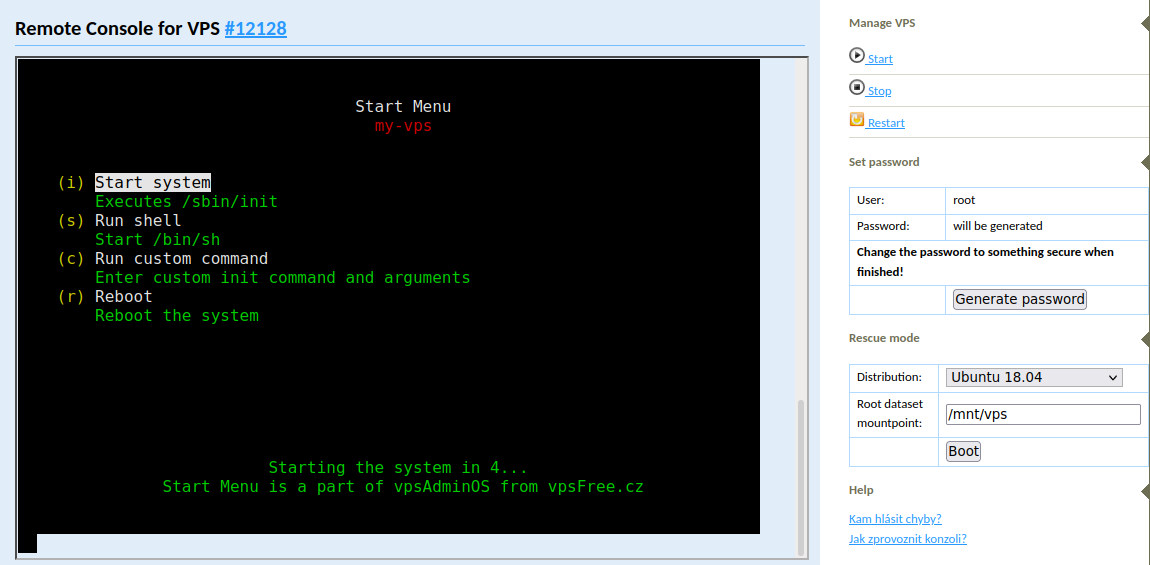
Starting a shell can often replace rescue mode for a quick repair of a system that won't start. It uses /bin/sh from the VPS's disk, and returns to the start menu when the shell exits.
You can enable or disable the start menu in vpsAdmin. It only supports VPSes on vpsAdminOS. You can also set how long it waits for input before automatically starting the VPS system. The default is 5 seconds.
You'll find an example in our knowledge base.
The menu is currently enabled on node1.stg (Staging). You can enable it individually on production VPSes by setting a timeout in the VPS details, for example 5 seconds. We'll enable it on all VPSes during this week or next.