We've added GRE tunnel support to our servers, making it easy to connect several VPSes.
If you need a simple connection between two different servers, virtual or physical, GRE is the easiest option. It's a tunnelling protocol originally developed at Cisco. We've added the ip_gre modules to our nodes' kernels, so you can create your own tunnels.
On the first server (185.8.165.156), configure the following:
[root@185.8.165.156]# ip tunnel add tunnel0 mode gre local 185.8.165.156 remote  37.205.10.152
[root@185.8.165.156]# ip a add 192.168.1.1/24 dev tunnel0
[root@185.8.165.156]# ip link set up dev tunnel0
On the second (37.205.10.152), do the equivalent:
[root@37.205.10.152]# ip tunnel add tunnel0 mode gre remote 185.8.165.156 local 37.205.10.152
[root@37.205.10.152]# ip a add 192.168.1.2/24 dev tunnel0
[root@37.205.10.152]# ip link set up dev tunnel0
This should now work:
[root@37.205.10.152]# ping 192.168.1.1
A very simple diagram of how GRE works:
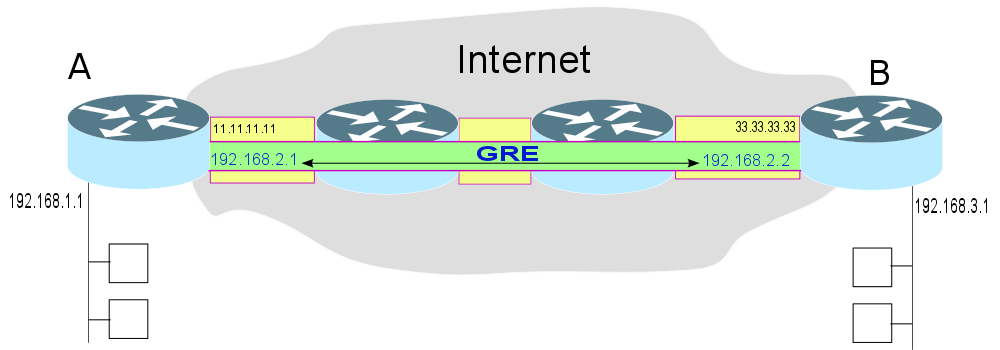
You'll probably want a persistent configuration. See the guides in our knowledge base for RHEL/CentOS and Debian/Ubuntu.
Within our datacentre, traffic stays on a private network, so you don't need to worry about eavesdropping. Between Prague and Brno, all router-to-router traffic is encrypted with IPSec, so there's no danger there either. But if you create a tunnel beyond our infrastructure (there's no restriction on this), you must protect your data yourself at a higher layer.
Unfortunately, IPSec doesn't work for us with OpenVZ, so we can't run GRE securely to outside destinations. The bug has been reported upstream, but there's been no response yet. We hope to be able to offer IPSec in time.
What's it useful for? If you run several VPSes on our infrastructure, it gives you a simple way to connect them directly. GRE is also useful for connecting two KVM virtual machines inside containers: just bridge the tunnel interfaces with the interfaces leading to KVM.